> For the complete documentation index, see [llms.txt](https://docs.trojan.com/llms.txt). Markdown versions of documentation pages are available by appending `.md` to page URLs; this page is available as [Markdown](https://docs.trojan.com/terminal-overview/tools-and-widgets/wallet-analyzer.md).

# Analyzer

Trojan Trading's wallet Analyzer equips you with advanced metrics to evaluate a wallet’s trading performance.

<div align="left"><figure><img src="https://929272793-files.gitbook.io/~/files/v0/b/gitbook-x-prod.appspot.com/o/spaces%2F7NS5fH98vYksfOLmRuJn%2Fuploads%2F2wWo6Cnxg0PP5he6IUzo%2FAnalyzer%20partial%204k.png?alt=media&amp;token=0af014db-76d0-447d-8dd9-1d4447a69506" alt="Full screen shot of the wallet analyzer in action" width="563"><figcaption></figcaption></figure></div>

Dig deeper into top traders’ wallets you’ve come across, or use it on your own wallet to sharpen your strategy and gain insight. You can also **migrate them into our Copy Trade feature with a single click**.

* **Enter a wallet address** in the 'Search' field to load the Analyzer.
* Select the timeframe.
* **Review wallet performance in the 'Profit & Loss' section**. See Realized and Unrealized PNL %, total PNL, win rate, and a PNL chart.&#x20;

<figure><img src="https://929272793-files.gitbook.io/~/files/v0/b/gitbook-x-prod.appspot.com/o/spaces%2F7NS5fH98vYksfOLmRuJn%2Fuploads%2FxJcTzKTulULwf4SIM6I7%2FAnalyzer%20PNL%204k.png?alt=media&amp;token=f6d3985c-1ec6-48e5-86c2-d9db041224c4" alt="The profit and loss section of the analyzer" width="375"><figcaption></figcaption></figure>

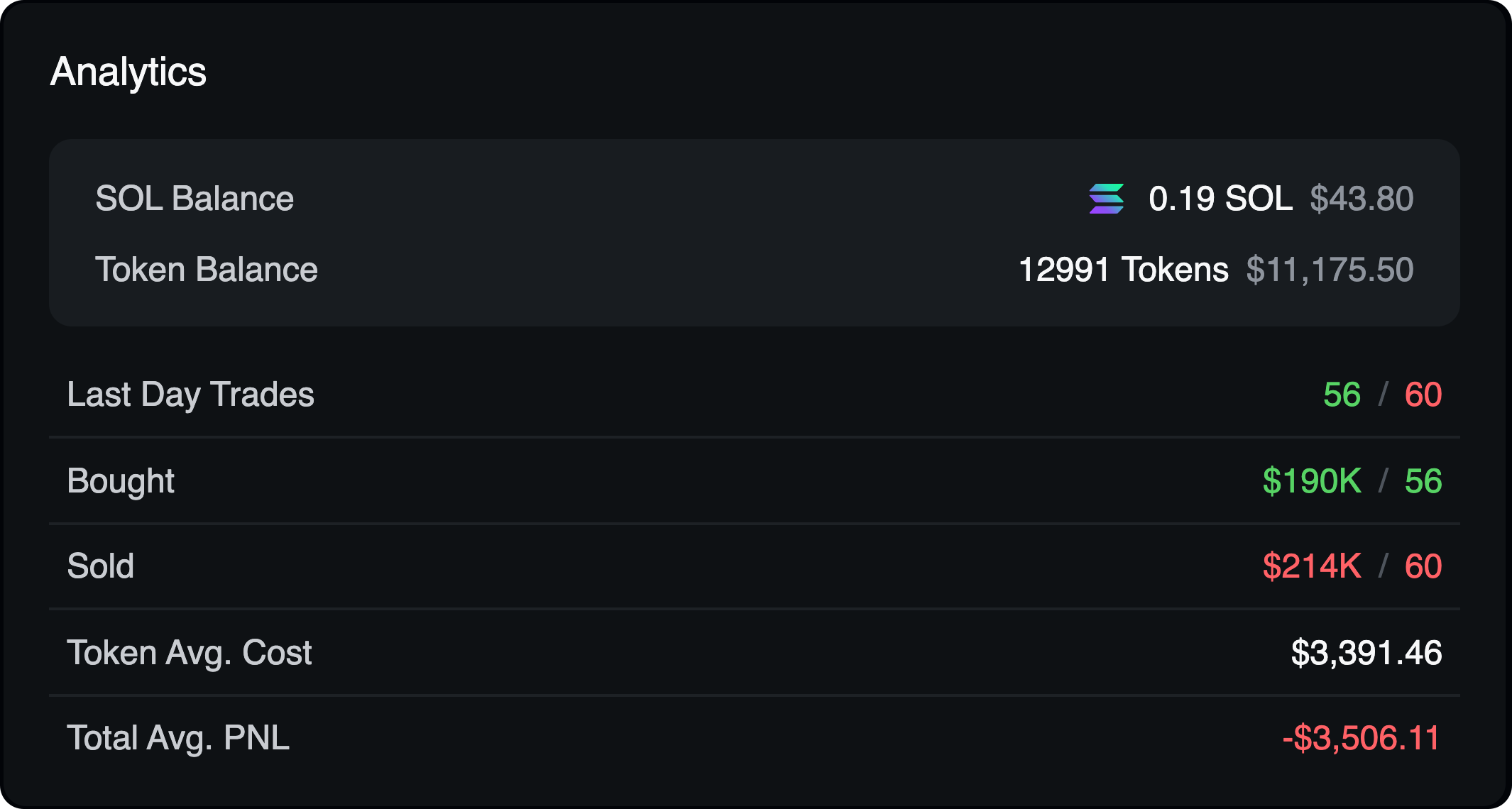
* In the center are Analytics. Pure stats. Flip across the timeframes for more insight.

<figure><img src="https://929272793-files.gitbook.io/~/files/v0/b/gitbook-x-prod.appspot.com/o/spaces%2F7NS5fH98vYksfOLmRuJn%2Fuploads%2FrSI73qoPxxwMMvCdgrSc%2FAnalyzer%20analytics%204k.png?alt=media&amp;token=edb3d650-e7c5-4c2d-af62-3490688856ae" alt="The analytics section of the analyzer" width="375"><figcaption></figcaption></figure>

* Examine the wallet in the 'PNL Distribution' section to **see how that PNL came to be - was it one big win, or consistency over time?** The **View Distribution** button will give you a more detailed look into those wins and losses, and the involved token(s).&#x20;

<figure><img src="https://929272793-files.gitbook.io/~/files/v0/b/gitbook-x-prod.appspot.com/o/spaces%2F7NS5fH98vYksfOLmRuJn%2Fuploads%2F1DvoIFI0QHDvHIU921I6%2Fanalyzer%20pnl%20distribution%204k.png?alt=media&amp;token=b22aa0fa-b9db-457c-8e51-9b36657e7424" alt="The PNL distribution section of the analyzer" width="375"><figcaption><p>To view details, including individual token performance, click <strong>View Distribution.</strong></p></figcaption></figure>

* View the 'Activity' tab to see a detailed trade log. The 'Positions' tab shows the current holdings.

<figure><img src="https://929272793-files.gitbook.io/~/files/v0/b/gitbook-x-prod.appspot.com/o/spaces%2F7NS5fH98vYksfOLmRuJn%2Fuploads%2FNWGZyX7ywBIyZjWjnuTw%2FAnalyzer%20tables%20tabs%204k.png?alt=media&amp;token=5cda1129-56de-49fa-8412-07088a854c4e" alt="The tables at the bottom of the analyzer page. Activity, positions, recent PNL&#x27;s." width="375"><figcaption></figcaption></figure>

{% columns %}
{% column width="58.333333333333336%" %}

* Click **Copy** **Trade** to import the wallet into the [Copy Trade](/terminal-overview/tools-and-widgets/copy-trading-bot.md) system with one action.
* Click **Track** **Wallet** to add to tracked wallets.
* Click **My** **Wallets** to see your own wallet stats.
  {% endcolumn %}

{% column width="41.666666666666664%" valign="middle" %}

<figure><img src="https://929272793-files.gitbook.io/~/files/v0/b/gitbook-x-prod.appspot.com/o/spaces%2F7NS5fH98vYksfOLmRuJn%2Fuploads%2FCmdvZtnaqxxyTG6sUiRX%2FAnalyzer%20buttons%204k.png?alt=media&amp;token=fb0f6e45-15f2-40f3-9114-253a5cf3dc09" alt="Buttons used to link the wallet being analyzed to other sections of terminal. Copy trade, the wallet, tracker, and your own wallets"><figcaption></figcaption></figure>
{% endcolumn %}
{% endcolumns %}

<figure><img src="https://929272793-files.gitbook.io/~/files/v0/b/gitbook-x-prod.appspot.com/o/spaces%2F7NS5fH98vYksfOLmRuJn%2Fuploads%2FWrDh2FQgR1YIZQOwdjMV%2FAnalyzer%20USD%20SOL%20toggle.gif?alt=media&amp;token=c13f3ca9-0a5e-4856-abcc-f0e56f7f8d78" alt=""><figcaption></figcaption></figure>

{% hint style="info" %}
In the **Activity** and **History** tabs, click to switch from USD values to SOL
{% endhint %}