
Full Screen Trenches page
Full Screen Trenches page
 , docked right
  ,\
undocked (floating)
,\
undocked (floating)  \
or in its own window
\
or in its own window  {% endcolumn %}
{% column valign="middle" %}
{% endcolumn %}
{% column valign="middle" %}

Trenches docked on the left.

Adjust Quick Buy Settings for each column individually.


 No two traders are the same, so why should your tools all look and work the same? Jump into the Customization menus in Trenches and make it custom fit your style
{% tabs %}
{% tab title="Display Tab" %}
No two traders are the same, so why should your tools all look and work the same? Jump into the Customization menus in Trenches and make it custom fit your style
{% tabs %}
{% tab title="Display Tab" %}


 . Migrated/Launched shows both
  . Migrated % shows simply that
  .
**Market Cap, Volume, Holders:** Set custom color-coded thresholds for each metric. Edit the values and assign a color to each tier to match how you read the market. Reset to defaults with the icon next to each metric name.
{% endtab %}
{% tab title="Layout Tab" %}
.
**Market Cap, Volume, Holders:** Set custom color-coded thresholds for each metric. Edit the values and assign a color to each tier to match how you read the market. Reset to defaults with the icon next to each metric name.
{% endtab %}
{% tab title="Layout Tab" %}


Token Cards display a wide array of information.
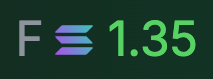 Displays real-time global fees paid for this token. It helps detect potential bundled launches by analyzing the total validator fees, and comparing that figure with volume and market cap.
{% endcolumn %}
{% endcolumns %}
{% hint style="info" %}
Displays real-time global fees paid for this token. It helps detect potential bundled launches by analyzing the total validator fees, and comparing that figure with volume and market cap.
{% endcolumn %}
{% endcolumns %}
{% hint style="info" %}
 Hover over the Pump Fun Fee Details icon to see the locked status, and the recipient.
{% endhint %}
Hover over the Pump Fun Fee Details icon to see the locked status, and the recipient.
{% endhint %}
| General / Overall | |
|---|---|
| Launchpad: | Filter results by launchpad(s) of choice. Mix and match, choose one, or all. Make it custom. Can also filter here by Pump Fun token types |
| Ticker / Name: | Search / Filter by name or Ticker. |
| Audit | |
|---|---|
| With at least 1 social: | Filters token list to only include tokens with a social media presence. |
| Dexscreener Paid: | Toggle Dexscreener Paid to show only tokens that have invested in enhanced visibility. |
| Livestream: | Toggle Livestream to show tokens with active live broadcasts. |
| Migration Progress: | Set a Migration Progress range to filter tokens based on how close they are to completing their migration goal. |
| Ownership: | Filter by the percentage of tokens held across groups like Dev Holding, Snipers, Insiders, Top 10 Holders, and overall Holder Count to gauge distribution and community spread. |
| Metrics | |
|---|---|
| Financial Metrics: | Filter by Market Cap, Gas Fees and Liquidity to choose tokens that reflect your comfort with risk and upside. |
| Trading Activity: | Measure momentum with 24-Hour Volume, Number of Swaps, Buys, and Sells to find tokens with the buzz you want. |
| Token Age: | Filter by Token Age to view tokens within a specific timeframe since launch. |
 | Copy Token Contract Address to Clipboard |
 | Add Token to Watchlist |
 | X profile |
 | Website |
 | Pump Fun Listing Link |
 | X Search for Contract Address |
 | Telegram |
 | X Community |
 | Linked X Post |
 | Project-Submitted Link |
 | DexScreeener Updated |
 | Pump Fun Live Stream Link |
 | Pump Cashback, if enabled for that token. |
%20copy.png?alt=media&token=e4607b24-0d2e-4e11-ba32-3fb12676ae36) | Pump Fun agent mode is active |
 | Pump Fun Fee details |
 | Top 10 Holders |
 | Dev Holding |
 | Snipers Holding |
 | Insiders Holding |
 | Bundlers Holding |